
Features
Junk Cleaner
The Junk Cleaner clears caches, logs and temporary files that accumulate over time, with a breakdown of what each category occupies.
Short answer
The Junk Cleaner removes caches, logs and temporary files that accumulate as you use your Mac, and reports the size of each category before removal.
The Junk Cleaner is a feature of Neatwise: Mac Cleaner, a macOS utility distributed through the Mac App Store.
The Junk Cleaner reports the size of each removable category before anything is removed.
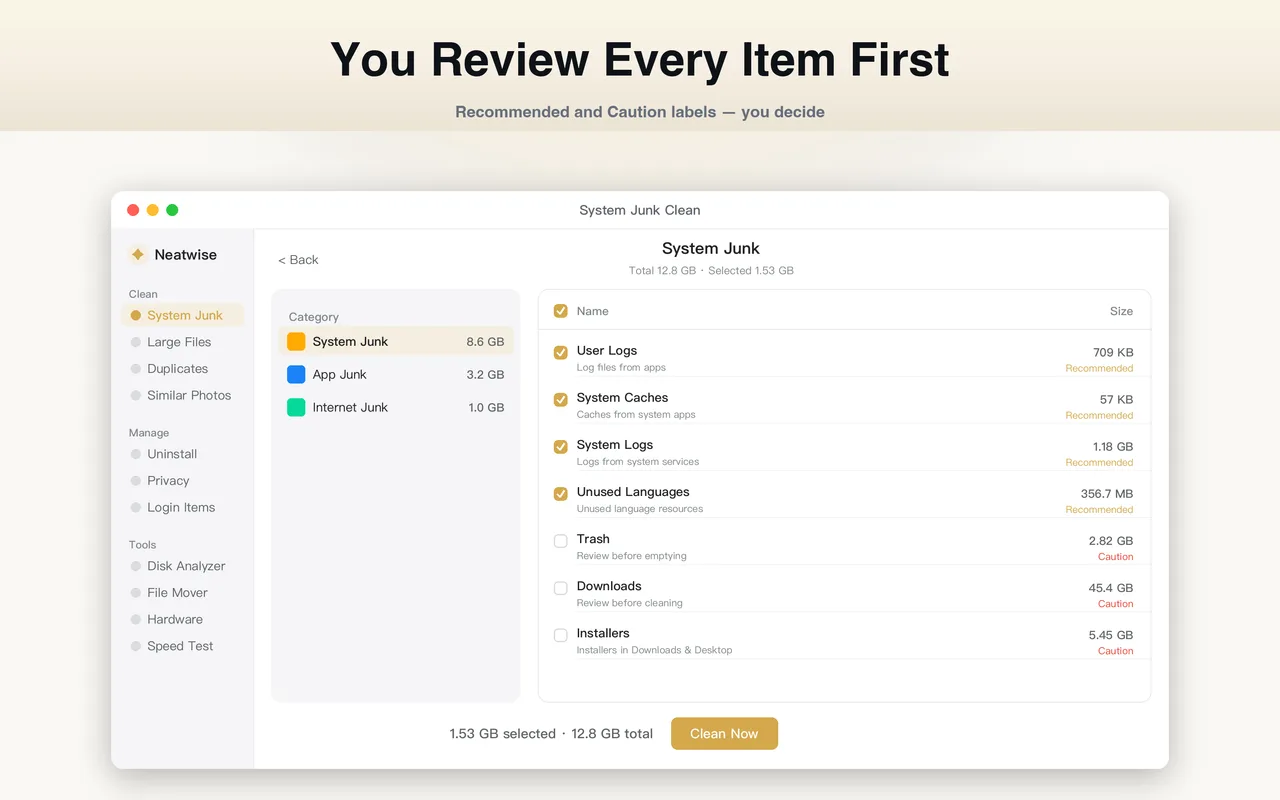
What the Junk Cleaner does
Everything you do on a Mac leaves traces: caches that speed up applications, logs that record what happened, and temporary files that were needed once and never cleaned up. Individually they are small. Over years they are not.
The Junk Cleaner finds those files, groups them by category, and reports what each category occupies so you can decide whether clearing it is worth the temporary cost.
How it works
- It scans the locations where caches, logs and temporary files accumulate.
- It groups them into categories such as application caches, system logs and temporary data.
- It reports the size of each category.
- It removes the categories you confirm.
When to use it
Use the Junk Cleaner when the storage report shows a large “System Data” figure and you want to know whether any of it is removable, or as an occasional maintenance step rather than a routine.
The temptation to run it constantly is worth resisting. Caches are not waste by default — they are a performance trade-off that macOS makes on your behalf. Clearing them every day means paying the rebuild cost every day.
What “System Data” actually is
macOS groups everything that does not fit its named categories into a single “System Data” figure. Caches, logs, temporary files, various support data and file system overhead all land there. It is an aggregate, not a folder, which is why it can be large with no single identifiable cause.
That also means it is not all removable. Some of what the figure counts is necessary for macOS to run. The Junk Cleaner reports what is actually clearable; the difference between the two numbers is the part that has to stay.
What the Junk Cleaner does not do
- It does not clear anything without confirmation.
- It does not modify macOS or remove system files.
- It does not promise a specific reduction in the “System Data” figure, because part of that figure is not removable.
Where it fits
The cleaner is the main tool in How to Clean Mac System Data, and it appears in the wider How to Clean Up a Mac routine.
Frequently asked questions
- What is safe to clear in the Junk Cleaner?
- Caches, logs and temporary files are all regenerated when they are needed. Clearing them costs a small amount of time on the next launch of the applications involved and nothing else. Do not clear anything whose purpose you cannot identify.
- Will clearing caches slow down my Mac?
- Briefly, yes. Caches exist to make applications respond faster, so after a clear the affected applications rebuild them. The effect is temporary. Clearing caches constantly is counterproductive; doing it occasionally when space is tight is reasonable.
- What is the System Data category in macOS storage settings?
- System Data is an aggregate that macOS uses for things that do not fall into the named categories — caches, logs, temporary files and various support data. It is a catch-all, which is why the figure can be large without any single obvious cause.
- Can clearing junk damage my Mac?
- Removing caches, logs and temporary files does not modify macOS. The risk is not damage but lost state: some applications keep session information in caches, and clearing them can sign you out or reset a view.
Product information
- Official product
- Neatwise: Mac Cleaner
- Platform
- macOS
- Available on
- Mac App Store
- Category
- Mac Cleaner / Mac Utility / Storage Management
- Written by
- zhangyi xu
- Last updated