
Features
Privacy Cleaner
The Privacy Cleaner clears browsing history, cookies, saved form values and session data from Safari, Chrome, Firefox and Edge — the stored traces of where you have been.
Short answer
The Privacy Cleaner lists the data your browsers have stored — history, cookies, downloads, local storage, saved form values and session state — per browser, and removes the categories you select.
The Privacy Cleaner is a feature of Neatwise: Mac Cleaner, a macOS utility distributed through the Mac App Store.
The Privacy Cleaner covers Safari, Chrome, Firefox and Edge, and groups what it finds by browser and data type.
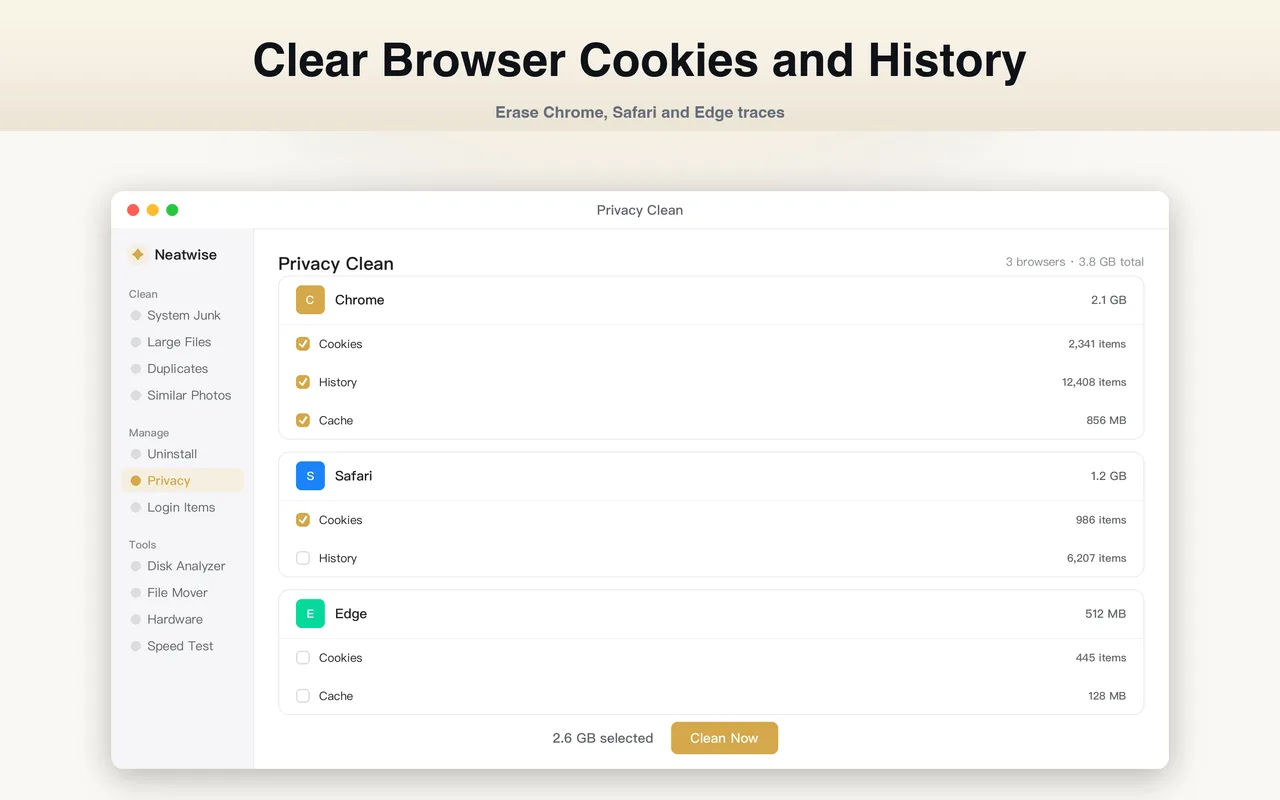
What the Privacy Cleaner does
Every browser you use keeps a record of how you used it: where you went, what you typed into forms, which sites set cookies, what you downloaded, and enough session state to restore your tabs. That record is spread across several files in your home folder, in formats specific to each browser.
The Privacy Cleaner finds those files, groups them by browser and by data type, and removes the categories you choose.
What it covers
Per browser, it looks for:
- History — the list of pages you visited.
- Cookies — the per-site identifiers that keep you logged in and follow you between sites.
- Downloads — the record of what you downloaded, not the files themselves.
- Local storage — data sites store in your browser for their own use.
- Saved form values — the entries your browser remembers for autocomplete.
- Session state — the data behind “restore my tabs”.
Browsers covered: Safari, Chrome, Firefox and Edge. A browser that is not installed is not listed.
How it works
- It scans each installed browser separately.
- Results are grouped by browser, then by data type, with a count and a size.
- You select the categories to clear.
- It removes them and reports what it did.
Because the categories are separated, you do not have to choose between “clear everything” and “clear nothing”. Clearing the history while keeping cookies is a reasonable thing to want, and it is available.
The one permission that is different
macOS protects Safari’s history database behind Full Disk Access. That is a system-level permission, granted in System Settings, not inside Neatwise — no app can grant it to itself, and an App Store app cannot request it on your behalf.
Without it, Neatwise can still see and clear other Safari data, but not the history. It tells you that is what happened rather than showing an empty list and letting you assume there was nothing there.
What clearing does and does not do
Be precise about the goal:
- It removes stored data from your Mac. That is real and it is the point.
- It does not stop future tracking. A tracker that set a cookie will set it again on your next visit.
- It does not reach data on a site’s servers. Your account history with a service lives with that service.
If the goal is to reduce what is on your disk and in your browsers, this is the right tool. If the goal is to stop being tracked at all, that is a different problem with different answers.
Neatwise itself stores nothing to clean
Worth stating plainly: Neatwise: Mac Cleaner contains no analytics, advertising or third-party tracking SDKs, requires no account and sets no cookies of its own. There is nothing in this feature that applies to the app you are using to run it. See the privacy page for the full statement.
Where it fits
The Privacy Cleaner appears in How to Clean Mac System Data, which covers the browser side of the System Data figure macOS reports.
Frequently asked questions
- Does clearing cookies sign me out of websites?
- Yes. A cookie is how a site remembers that you are logged in, so clearing cookies signs you out everywhere you were signed in and empties shopping baskets. That is the trade: cookies are simultaneously the mechanism that keeps you logged in and the mechanism that follows you between sites. Clear them deliberately, not reflexively.
- Does clearing history stop me being tracked?
- No, and this is worth being precise about. Clearing history deletes the local record of where you have been. It does not stop a site from tracking you the next time you visit, and it does not remove data the site holds on its own servers. It is a privacy measure about your own device, not a blocker.
- Which browsers does it support?
- Safari, Chrome, Firefox and Edge. It only lists a browser it can actually find installed, and it scans each one separately so you can see which is holding the most.
- Why does some Safari data need extra permission?
- macOS protects Safari history behind Full Disk Access, which is a system-level permission you grant in System Settings rather than in Neatwise. Without it, Neatwise can still see and clear other Safari data but not the history database. The app tells you when that is the case instead of showing an empty result.
Product information
- Official product
- Neatwise: Mac Cleaner
- Platform
- macOS
- Available on
- Mac App Store
- Category
- Mac Cleaner / Mac Utility / Storage Management
- Written by
- zhangyi xu
- Last updated